~make your own question sets
and turn them into a race to Jericho
that helps students remember
your lesson content~

Overview:
One to four teams or players race each other across the Sinai Wilderness answering quiz questions YOU have typed into the question editor ahead of time. ...First one to Jericho makes the walls come tumblin' down!
- Onscreen Animated Players advance through Sinai landscape when they answer questions correctly.
- First one to Jericho gets to see the walls knocked down.
- Fall of Jericho is themed on a race to Jericho, but... it can be about ANY subject you want it to teach.
- Great for playing immediately after your Bible study, and weeks later to enhance student memories of your lessons.
How the Jericho Quiz Game is played:
When students first start the game, they select from a menu of "question sets" you have created using the easy-to-use Question Editor, on any subject which you want to create a set about. (A sample set comes with the program.)
Teams sign-in and select which animated characters they to represent them on the screen. Now the race is on! Questions appear for each team to answer. There's no time limit to how long they can take to answer. Answer correctly, and your character advances across the Sinai (example picture right). Answer wrong and the next team can try to answer the question to advance.
The game has a number of features you can set depending on time and class size.
- One | Two | Three | or Four Players or Teams can play at one time.
- Questions can be set to come up in either random or sequential order
- New Questions with Each Turn or "Next Team must try to answer if first team gets it wrong"
- "Short Game" Option -for times when you need to get through the game more quickly
- Question Difficulty settings -set any question you create to reward students based on difficulty level of the question
- Add Verse Notations to answers
- Add Hints
- Add Comments to appear after a question is answered correct -a great way to slip in extra content.
- Add Background Messages to your games --add your own text messages or exhortations to appear in various scenes during the game. A fun customizing option that leaves your kids wondering "how'd you do that!"
AGE RANGE:
Fall of Jericho can be used with a WIDE AGE RANGE. Adults and kids enjoy Jerichio, but even non-readers will enjoy the game play and graphics if they have someone to read the questions to them. On average, we recommend creating about 25 questions per question set. You have options in the question creation process and game options to adjust for difficulty and ease of game play.VERSATILITY:
One of the reasons Fall of Jericho is popular in Sunday School computer labs is that it can be about almost ANY SUBJECT. It all depends on what YOU (or your students) type into the question editor. And that means it can fill a big hole in your software library when you don't have software on a certain subject, or don't have the computing power or budget to be able to get some other program. The kids never seem to tire of it.
|
900kb Low Resolution Video | 1.7mb Medium Resolution Video (clearer) |
Versions of Fall of Jericho has been a staple of the Christian ed. computer lab movement for many years. It gets used on individual computers, by groups, and even in very LARGE groups when projected on the wall using a data projector attached to your computer (if you have one). We've worked with our friend Mike, Jericho's developer, to continue to update this program with new graphics and features. Our version is always the LATEST version.
ABOUT THE EASY TO USE QUESTION EDITOR!
Simply open the Jericho Editor, create a new file name, start typing multiple choice questions and answers (or True False), add more, and save.
Then when you turn on the game, it will ask you what verse set you want to play with. Select from the menu of verse sets and away you go.
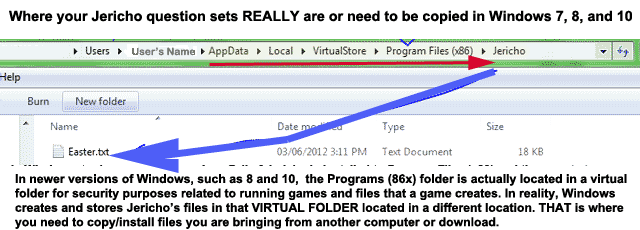
Verse sets can easily be copied from one computer to another using a diskette. Instructions are on the CD and in the Jericho Teaching Tips.
You can add scripture references and "explanatory notes" that appear onscreen with your Questions and Answers. You can choose to make your questions appear randomly or sequentially (which is nice if you're walking kids through a story line). You can also change the number of points awarded for each question.
System Requirements: Windows 98/ME/XP/Vista. Minimum 166mhz, 32 mb RAM, CD drive. Price: $28 for one. $24 each for two or more. $22 each for five or more*
Use our online order form or call 1-800-678-1948.
*HOW TO SAVE MONEY WHEN ORDERING JERICHO: When ordering please remember that Jericho is a TEAM game. You might have 4 PCs in your lab, but only need to buy 2 copies of Jericho for use on only 2 of your PCs because the kids will be grouping into teams. Jericho can handle up to 4 teams playing together, but I like to play just 2 or 3 teams with two or three kids per team PER PC. It keeps the game flowing. Smaller teams of just 2 or 3 kids also keeps some kids from sitting back and letting others answer for them. More teaching and team tips like this for Jericho are available in the Jericho Teaching Tips at this website.
Here's a picture that illustrates the TEAMS you can have playing Jericho:
With Fall of Jericho it is EASY to create one question set, and copy it to other computers so that all your students can be working on the same question set at the same time, no matter how many PCs you have with Jericho running. "How-to" is discussed in the Jericho Teaching Tips.
The Jericho CD comes with TWO BONUS GAMES:
Bible Concentration and Where's Noah.1. Bible Concentration has over two dozen set Bible verse rhebus "pict-o-grams" similar to the old TV SHOW version of Concentration. Kids flip tiles on the gameboard to find matching pairs. A match reveals a portion of the verse pict-o-gram underneath.
2. Where's Noah is a "Where's Waldo"-style game where students must find small objects hidden in the screen and beat the clock.
Please note: these 'bonus' games may not work in Vista or certain versions of W2000.
Fall of Jericho is a lot of fun to play. It has been used for many years in churches and the kids don't tire of it. The easy to use Question Editor makes it an extremely versatile tool for Christian education. It's so easy to make your own questions your kids and teens can do it. Our ON CD Teaching Tips provide you with plenty of great tips from many years of good classroom use.

View a Video Demo of Fall of Jericho
900kb Low Resolution Video | 1.7mb Medium Resolution Video (clearer)View and Print the Jericho Teaching Tips
(Also found on the CD)